
App Permissions & Security

Understanding Why MedicalRep Requires QUERY_ALL_PACKAGES Permission

Security & Fraud Prevention

MedicalRep is designed for the highly regulated pharmaceutical industry where location accuracy and data integrity are critical. We use advanced security measures to ensure that field representatives provide authentic location data and prevent fraudulent activities.

Why We Need QUERY_ALL_PACKAGES Permission

This permission allows our app to scan installed applications on your device to detect harmful apps that could compromise the integrity of our location tracking system.

🔒 Security Detection

Our app scans for and detects:

  • Fake GPS Applications - Apps that spoof or manipulate location data (e.g., Fake GPS, Mock Location)
  • Location Spoofing Tools - Developer tools that can fake your geographic position
  • Unauthorized Apps - Applications that could interfere with accurate location tracking
  • Security Threats - Potentially harmful apps that compromise device integrity

📸 Real-World Detection Examples

Our system actively monitors and detects users attempting to manipulate their location. Below are actual screenshots from our admin dashboard showing detected security violations:

List of users with Fake GPS apps
Admin Dashboard: List of users who have installed Fake GPS applications on their devices. Our backend system flags these users for compliance review.
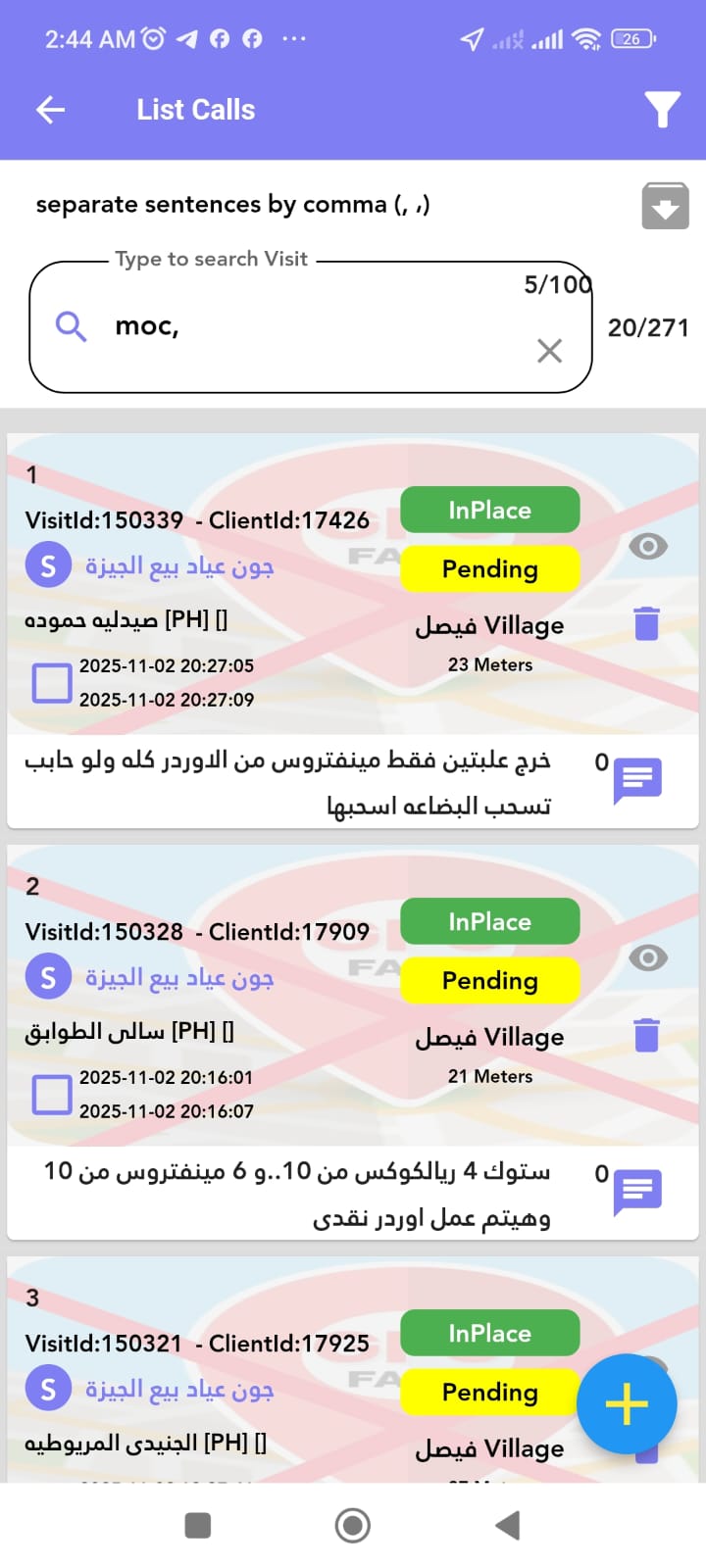
Visit using Fake GPS detection
Visit Report: Example of a visit attempt made using a Fake GPS app. The system detected the spoofed location and flagged it as fraudulent.

🏥 Industry Compliance

The pharmaceutical industry requires strict compliance:

  • Regulatory Requirements - Meeting pharmaceutical industry standards for field representative monitoring
  • Audit Trails - Maintaining comprehensive audit logs for regulatory compliance
  • Data Integrity - Ensuring visit reports and location data are authentic and unmanipulated
  • Company Policies - Enforcing enterprise device security policies

🛡️ How It Works

Our security system operates in four steps:

  • Step 1: Scanning - The app collects a list of installed applications on your device
  • Step 2: Backend Analysis - App data is sent securely to our servers for analysis
  • Step 3: Detection & Logging - Our backend algorithms identify harmful apps and flag security violations for compliance reporting
  • Step 4: Protection - Security violations are logged and administrators are notified to take appropriate action

📹 Video Tutorial

Watch this video to understand how our security system protects against location fraud:

📊 What Data We Collect

  • List of installed application names and package identifiers
  • Device security status and risk assessment
  • Detection results for fake GPS and spoofing apps
  • Timestamp of security scans

🔐 Data Protection

Your data is protected through:

  • Encrypted Transmission - All data sent to servers uses industry-standard encryption
  • Secure Storage - Information is stored on secure, access-controlled servers
  • Limited Access - Only authorized system administrators can view security reports
  • Compliance - We follow GDPR, HIPAA, and other applicable privacy regulations

❓ Why Not Use Alternatives?

Google recommends using <queries> tags for specific app packages. However, this approach is insufficient for our security needs because:

  • New fake GPS apps are constantly created with different package names
  • Spoofing tools frequently change their identifiers to avoid detection
  • Our security system must adapt to evolving threats in real-time
  • Comprehensive scanning is essential for maintaining audit integrity in regulated industries

✅ Our Commitment

We are committed to transparency and responsible data usage:

  • We only collect app lists for legitimate security purposes
  • No personal information is extracted from detected apps
  • You can review our complete Privacy Policy for full details
  • Contact us anytime with questions or concerns

📧 Questions?

If you have any questions about our app permissions or security practices, please don't hesitate to contact us.

Contact Support